Quick answer
Can I use the same eSIM for another trip?
Yes. Keep the eSIMbundle eSIM profile installed on the same phone. When you purchase another destination data bundle, it is added to the reusable eSIM, so you do not normally need to scan the QR code or install the eSIM again.
The reusable eSIM profile and the individual data bundles are separate. A finished bundle does not remove the eSIM, and a new bundle has its own allowance, validity period and status.
The eSIM profile and data bundle are different
The eSIM profile is the reusable part installed on your phone. A data bundle is the destination plan attached to that eSIM, such as a Thailand, Japan or regional bundle with a specific data allowance and validity period.
You install the eSIM profile once. You can then use separate data bundles for different trips without deleting and reinstalling the profile each time.
Reusable eSIM profile
- Installed on the phone
- Stays available between trips
- Visible under Account → My eSIM
- Can hold multiple separate bundles
- Should not be deleted after each trip
Data bundle
- Provides data for a destination or region
- Has its own allowance
- Has its own validity period
- Starts automatically on first use
- Can end while the eSIM profile remains installed
Think of the eSIM profile as the reusable container on the phone and each bundle as a separate travel data plan added to it.
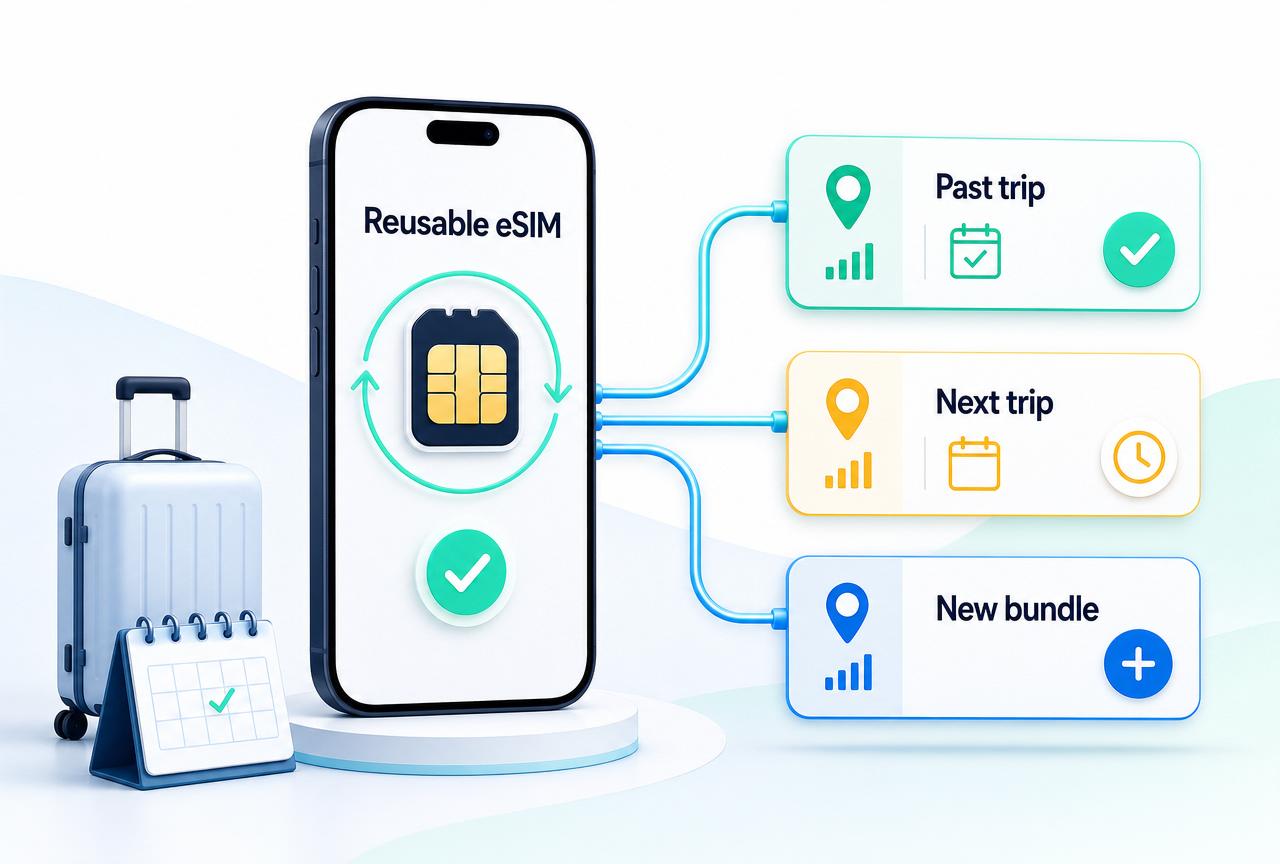
Reuse snapshot
- InstallOnce on the phone
- Between tripsKeep eSIM installed
- Next tripAdd a new bundle
- Each bundleSeparate validity and status
Avoid these mistakes
- Deleting after each trip
- Rescanning the old QR code
- Restarting an ended bundle
- Moving phones without checking
What reusing the eSIM means
Reusing the eSIM means keeping the profile installed and attaching another data bundle to it. It does not mean restarting an expired bundle or rescanning an old QR code.
Keep the profile
Leave the installed eSIM on the phone between trips.
Add a new bundle
Purchase the destination or regional bundle needed for the next trip.
Automatic first-use start
The new bundle starts automatically when it first connects to a supported network in its coverage area.
Use the same My eSIM profile
The account shows the new bundle attached to the reusable eSIM.
The new bundle is separate from previous bundles even though they use the same installed eSIM profile.
How to prepare for your next trip
- Keep the existing eSIMbundle eSIM installed on the phone.
- Sign in to your eSIMbundle account.
- Open Account → My eSIM and confirm the eSIM still shows Installed.
- Open Account → Bundles and review any previous bundles.
- Choose the destination or regional plan needed for the next trip.
- Complete the purchase while signed in to the same account.
- Return to Account → My eSIM and confirm the new bundle appears on the installed eSIM.
- Open the new bundle and confirm it shows Not started yet before first use.
- Before travelling, check that the eSIM remains present in the phone’s SIM settings.
- At the destination, select the travel eSIM for mobile data and follow the required roaming settings.
No second installation
Do not scan the QR code again for a normal new trip
When the reusable eSIM is already installed on the same phone, the new data bundle should use that profile. Reinstalling the profile is a different action and may not be possible.
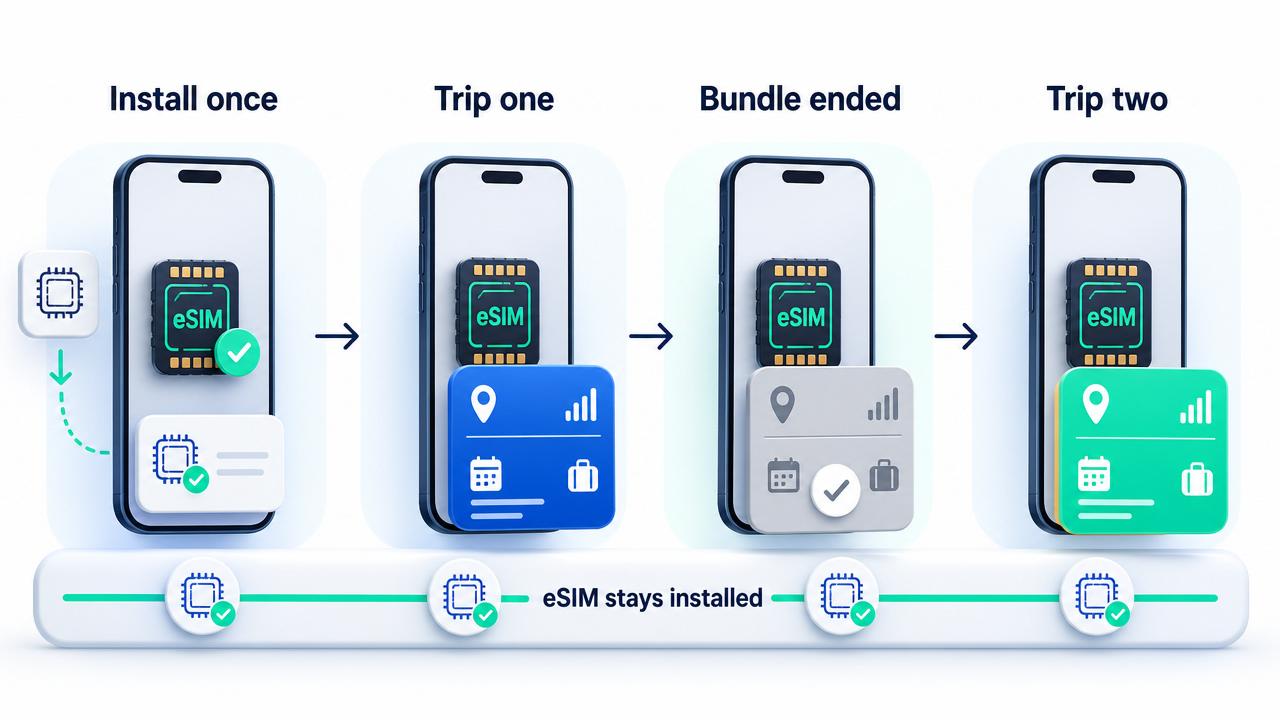
Install once, use across trips
Install profile → Use first bundle → Keep eSIM → Add next bundle
- 1Install
Install the reusable eSIM
Add the eSIM profile to the phone once and confirm it appears in SIM settings.
- 2Trip one
Use the first data bundle
The first bundle has its own destination, allowance, validity and status.
- 3Keep
Leave the eSIM installed
When the first bundle ends, keep the reusable profile on the phone.
- 4Trip two
Add the next data bundle
Purchase another bundle and view its separate status in the account.
Returning to the same destination
You can purchase another data bundle for a destination you have visited before. The new bundle is a separate plan with its own allowance, validity and status.
- The old bundle does not restart.
- Unused validity from an expired bundle does not move into the new bundle.
- The new bundle receives its own status and dates.
- The reusable eSIM profile remains the same on the phone.
- You normally do not need to scan the QR code again.
Check the new bundle under Account → Bundles rather than relying on the details from the previous trip.
Travelling to a new destination
The reusable eSIM can also hold a bundle for a different country or region. The destination changes at the bundle level; the installed eSIM profile remains on the phone.
Previous trip
- Destination
- Thailand
- Bundle
- Ended
- eSIM profile
- Still installed
Next trip
- Destination
- Japan
- Bundle
- Not started yet
- eSIM profile
- Same installed profile
This example illustrates the account model only. Do not hard-code Thailand or Japan as required destinations in product logic.
What to do between trips
When you are not currently using a travel bundle, keep the eSIM profile installed. You may turn the eSIM line off in the phone settings if you do not need it, but turning it off is different from deleting it.
- Keep the eSIM profile installed.
- Turn the travel eSIM line off temporarily only if needed.
- Keep the account connected to the email used for purchases.
- Do not delete the profile after a bundle expires.
- Do not repeatedly scan the installation QR code.
- Review the eSIM status before the next trip.
- Purchase a new bundle when you know the next destination.
Turn off is not delete
Turning off the eSIM keeps the profile on the phone
Deleting or removing the eSIM removes the profile. Reinstallation may not be possible with the same QR code or setup details.
When the previous bundle has ended
A bundle can end because its validity expires, its fixed allowance is used up, it is cancelled, refunded or otherwise closed. The ended state belongs to that bundle—not automatically to the reusable eSIM profile.
Previous data bundle
Shows an ended customer-facing status such as Used up, Expired, Cancelled, Refunded or Ended.
Reusable eSIM profile
Can remain installed and ready to hold another destination bundle.
Do not delete the eSIM simply because one attached bundle has ended.
Multiple bundles on one eSIM
Account → My eSIM can show several data bundles attached to the same reusable profile. Each bundle is managed separately.
- Ended
Past destination
5 GB · 30 days
- Not started yet
Next destination
3 GB · 30 days
- Not started yet
Regional bundle
10 GB · 30 days
Each bundle starts and ends independently based on its own provider-confirmed network use and lifecycle.
Each new bundle starts separately
Adding a new bundle to the installed eSIM does not start it. It starts automatically on first use within its coverage area.
- Start on first useThe new bundle starts when My eSIM first connects to a supported network in its coverage area.
- Before first useThe account shows Not started yet until the provider confirms first network use.
- After first useThe provider confirms the start, and the validity period begins.
Understand automatic first-use activation
Every bundle starts automatically on first use.
Understand activation and validityHow the included VPN works between trips
The included VPN follows active eSIMbundle data plans. Keeping the reusable eSIM installed does not by itself keep VPN access active between bundles.
- Bundle not started yetVPN access waits for the bundle to start.
- Bundle activeVPN access is available through VPNclient.
- No active bundleThe VPN account may remain prepared, but access from an ended bundle is no longer active.
VPNclient does not connect automatically when a new bundle starts. Open the app and select Connect when you want to use the included VPN.
Set up the included VPNWhat if you changed phones?
Reusing the eSIM on the same phone is different from transferring it to another device. An eSIM profile may not always be transferable or reusable on a new phone.
Before changing devices
Keep the old phone and eSIM until the new setup is confirmed
Do not delete the eSIM from the old phone or assume the original QR code will work again. Contact support before attempting to transfer or reinstall the profile.
- Keep the old phone available.
- Keep the original eSIM installed.
- Do not factory-reset or trade in the phone yet.
- Do not repeatedly scan the old QR code.
- Have the account email and eSIM details ready.
- Contact support for the correct next step.
What not to do
- Do not delete the eSIM after every trip.
- Do not scan the installation QR code again for each new bundle.
- Do not expect an expired bundle to restart.
- Do not assume old unused data moves into a new bundle.
- Do not assume installing My eSIM starts a new bundle.
- Do not confuse the reusable eSIM profile with an individual data bundle.
- Do not assume all attached bundles share one validity period.
- Do not delete the profile because one bundle says Used up or Expired.
- Do not move the eSIM to another phone without checking first.
- Do not assume keeping the eSIM installed means VPNclient is connected.
Remember
Keep the eSIM; replace the bundle
The reusable eSIM remains installed. Each trip uses a separate destination data bundle.
If the new bundle does not appear or work, check in this order
Check the account, installed profile and new bundle before scanning the QR code or deleting anything.
- Confirm you are signed in to the account used for the new purchase.
- Open Account → My eSIM and confirm the reusable profile still shows Installed.
- Check that the eSIM still appears in the phone’s SIM or mobile-network settings.
- Open Account → Bundles and look for the new destination bundle.
- Confirm the destination, allowance and validity belong to the new trip.
- Open the new bundle and check whether it is Preparing, Not started yet, Active or ended.
- If it is Not started yet, confirm My eSIM is selected for mobile data within the bundle’s coverage area.
- Do not rescan the eSIM QR code merely because the bundle is waiting.
- If the bundle is Active but data does not work, use the eSIM data troubleshooting guide.
- If the reusable eSIM profile is missing from the phone, do not repeatedly reinstall it without support guidance.
- If you changed phones, keep the old device and contact support before deleting anything.
- Contact support with the account email, phone model, eSIM status and new bundle status if the bundle still does not appear correctly.
Product pages and official sources
This guide reflects the current reusable-eSIM and separate-bundle model shown in the eSIMbundle account, together with official device guidance about managing installed eSIMs.
Frequently asked questions
Can I reuse my eSIM for another trip?
Yes. Keep the reusable eSIM profile installed on the same phone and purchase another destination data bundle. The new bundle is added to the installed eSIM and has its own allowance, validity period and status.
Do I need to scan the QR code again for another trip?
Normally, no. If the reusable eSIM is already installed on the same phone, a new data bundle uses that profile. Do not rescan the QR code unless support specifically tells you to reinstall the eSIM.
Should I delete the eSIM after my trip?
No. Keep the eSIM profile installed if you may use eSIMbundle again. You can turn the line off temporarily if needed without deleting the profile.
Does an expired bundle delete the eSIM?
No. The expired status belongs to the individual data bundle. The reusable eSIM profile can remain installed and hold another bundle.
Can I buy another bundle for the same country?
Yes. The new bundle is a separate plan with its own data allowance, validity and status. It does not restart the old bundle.
Can I use the same eSIM for a different country?
Yes. A new country or regional bundle can be attached to the same reusable eSIM profile installed on the phone.
Can one eSIM have several bundles?
Yes. Account → My eSIM can show multiple destination bundles attached to the reusable profile. Each bundle is managed separately.
Do all bundles start together?
No. Each bundle starts automatically on its own first supported network use. Starting one bundle does not start every other bundle attached to My eSIM.
Does unused data move to the next bundle?
Do not assume that it does. Each bundle has its own allowance and validity period. The new bundle is separate from the previous one.
What happens to the included VPN between trips?
VPN access follows active data bundles. Keeping the reusable eSIM installed does not by itself keep VPN access active, and VPNclient does not connect automatically.
Can I move the eSIM to a new phone?
Do not assume that the profile can be transferred or reinstalled. Keep the old phone and eSIM available and contact support before deleting or moving anything.
What if the new bundle does not appear on My eSIM?
Confirm you are signed in to the correct account, check Account → Bundles and verify that the reusable eSIM still shows Installed. Contact support before rescanning the QR code or purchasing again.
Does adding a new bundle start it immediately?
No. Adding a bundle does not start it. It starts automatically when My eSIM first connects to a supported network in the plan’s coverage area.
Can I turn the eSIM off between trips?
Yes. Turning the eSIM line off keeps the profile installed. Deleting or removing it is different and may make reinstallation difficult or impossible.
